Tips & Tricks: Choosing the Right Image Resolution
Setting up a drawing at a significantly larger resolution creates softer transitions, more control over light and shadow, and noticeably more detail once it's scaled down.
2 min read
Did you know you can pull far more detail out of an illustration simply by making the canvas two to three times bigger?
I used to avoid this trick because I thought it would mean having to draw a lot more. In reality, it's almost the opposite. Working on a bigger canvas often saves time while also producing better results.
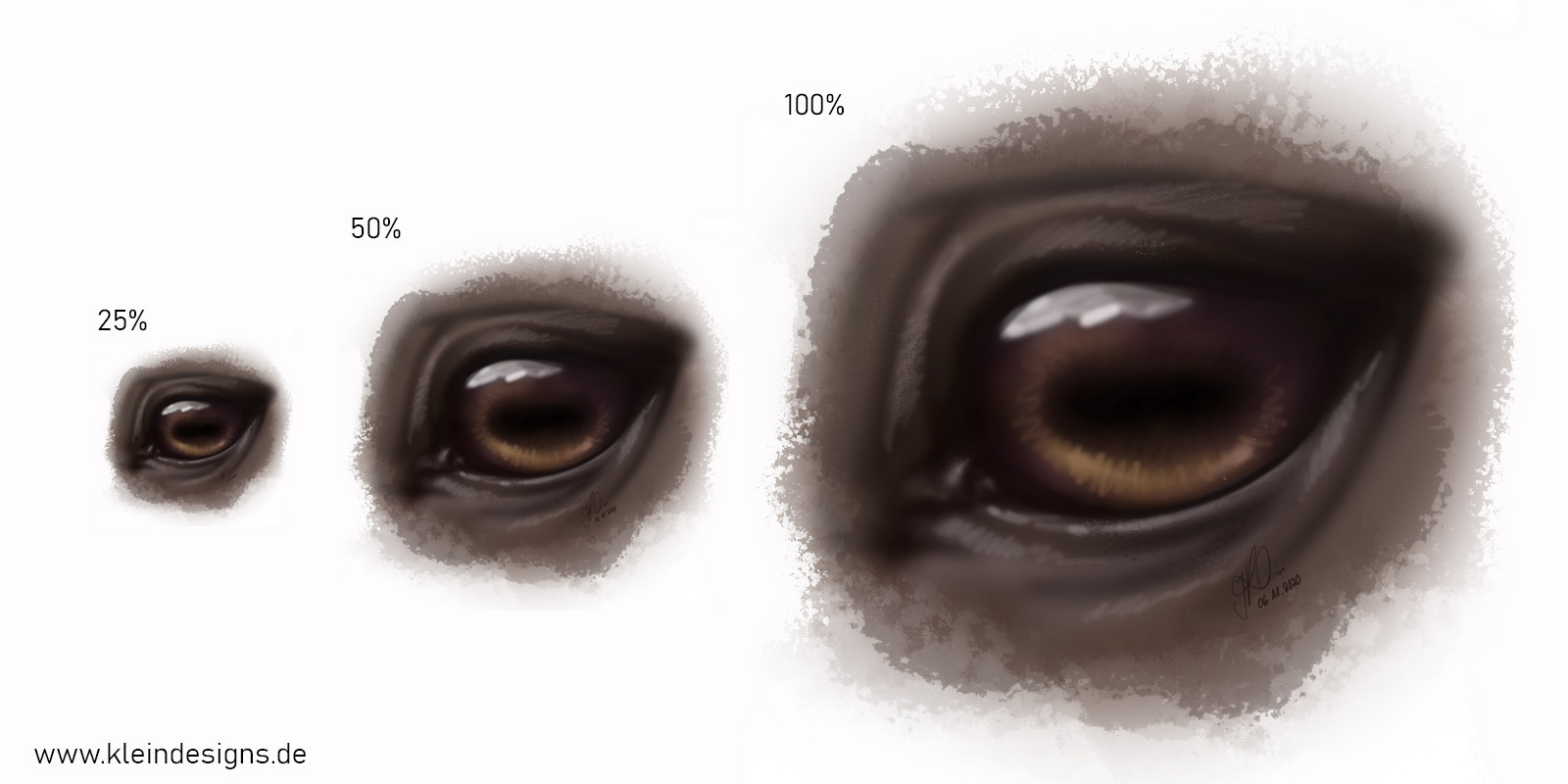
A larger resolution naturally leads you to use bigger brushes. Brush strokes become more sweeping and expansive, which often makes placing light and shadow easier. Many details are initially only hinted at through light hatching. When the image is later scaled down to 50–75%, that information blends together and creates a noticeably more detailed impression.
What does this have to do with confidence?
The more space you have to draw in, the easier it becomes to make long, confident brush strokes.
Working out light and shadow is much more comfortable than on a small canvas. Over time, you develop a better feel for depth, contrast, and form. As a result, fewer corrections are needed, and your confidence in the drawing grows.
In my experience, I've reworked and corrected small graphics far more often. There was often little room to let shadows fade out softly. On a larger canvas, transitions can be made much gentler, which makes the overall image feel more harmonious.
Big to small – more detail
Many artists struggle to get enough detail into their drawings. A higher working resolution often helps with exactly that.
If a drawing is set up, say, three times larger, there's enough room for extra image information. Details can initially be hinted at with fine hatching. Once the image is scaled down by up to 75%, that hatching blends together and creates the impression of precise detail.
This makes it possible to achieve results that would be hard to reach if you worked directly at the final resolution.
For the eye mentioned in this article, for example, here's roughly how I go about it:
- Block in the basic shadows with a large, soft brush.
- Correct and refine the shading as needed.
- Add highlights.
- Emphasize the darkest areas with contours.
- Hint at details with gentle hatching.
Thanks to the large canvas, there's still plenty of room for adjustments before the image is finally reduced to its intended size.
Conclusion
A larger working resolution doesn't automatically mean more work. Often it actually leads to a faster, more natural drawing process.
Bigger brushes, softer transitions, and the ability to let detail emerge only once the image is scaled down make this technique a simple but effective trick for digital illustrations.
See you soon,
Jackie